
Know which topics each student is stuck on before the mock tells you.
Every student practises fresh GCSE questions at their own level and the marking is done for you, so you get a grade for each student in every topic and can put your intervention exactly where it's needed.

The problems it fixes
Targeted intervention
The problemThe mock is often the first time you see which topics students are struggling with, and intervening for individual students can be tricky.
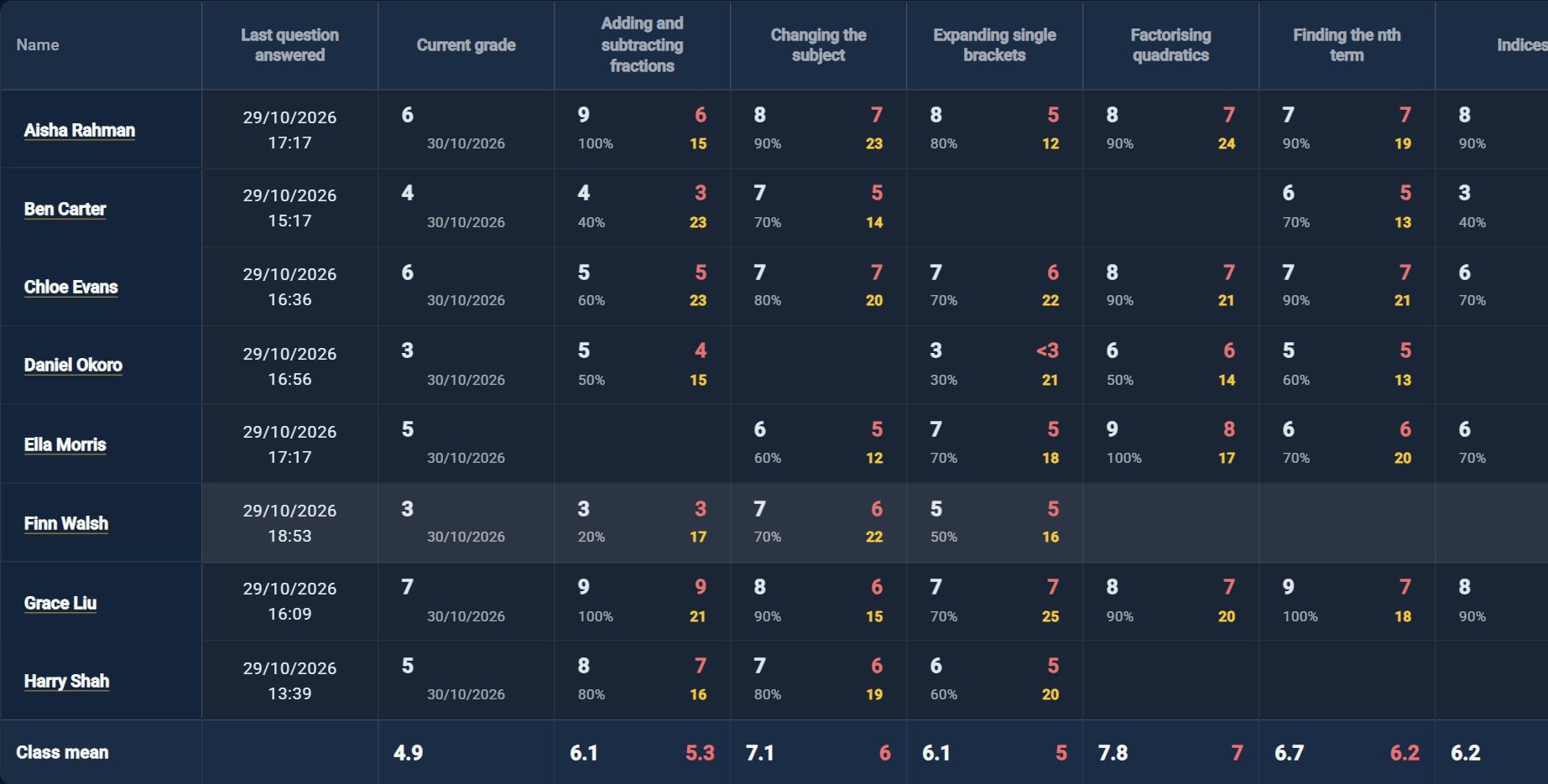
What changesEvery student has a grade in every topic they practise, so the class grid shows you who needs which topic and which topics they are starting to forget, in real time.
Less marking, less preparation
The problemWriting differentiated practice for a class of 30 can take a long time.
What changesThe questions are generated and marked for you, which frees up your time to be used more effectively on other things, and a ten-question mini mock goes out to a whole class or a single student in a couple of clicks.
Predicted grades
The problemThe mock can give you an overall result, but it doesn't leave a great deal of time to intervene.
What changesStudents get a predicted GCSE grade from their practice, so you have an overall prediction much earlier, which firms up as they cover more topics and leaves more time to make a positive change.
Unlimited practice
The problemCreating questions, or getting them up on the whiteboard, takes admin time you would rather spend teaching.
What changesStudents get a wide variety of different questions across more than 100 GCSE topics, and it's easy to project them onto your whiteboard straight from the platform.
Tutoring rather than teaching a class? The same tools work across all your students on one licence.
What you see
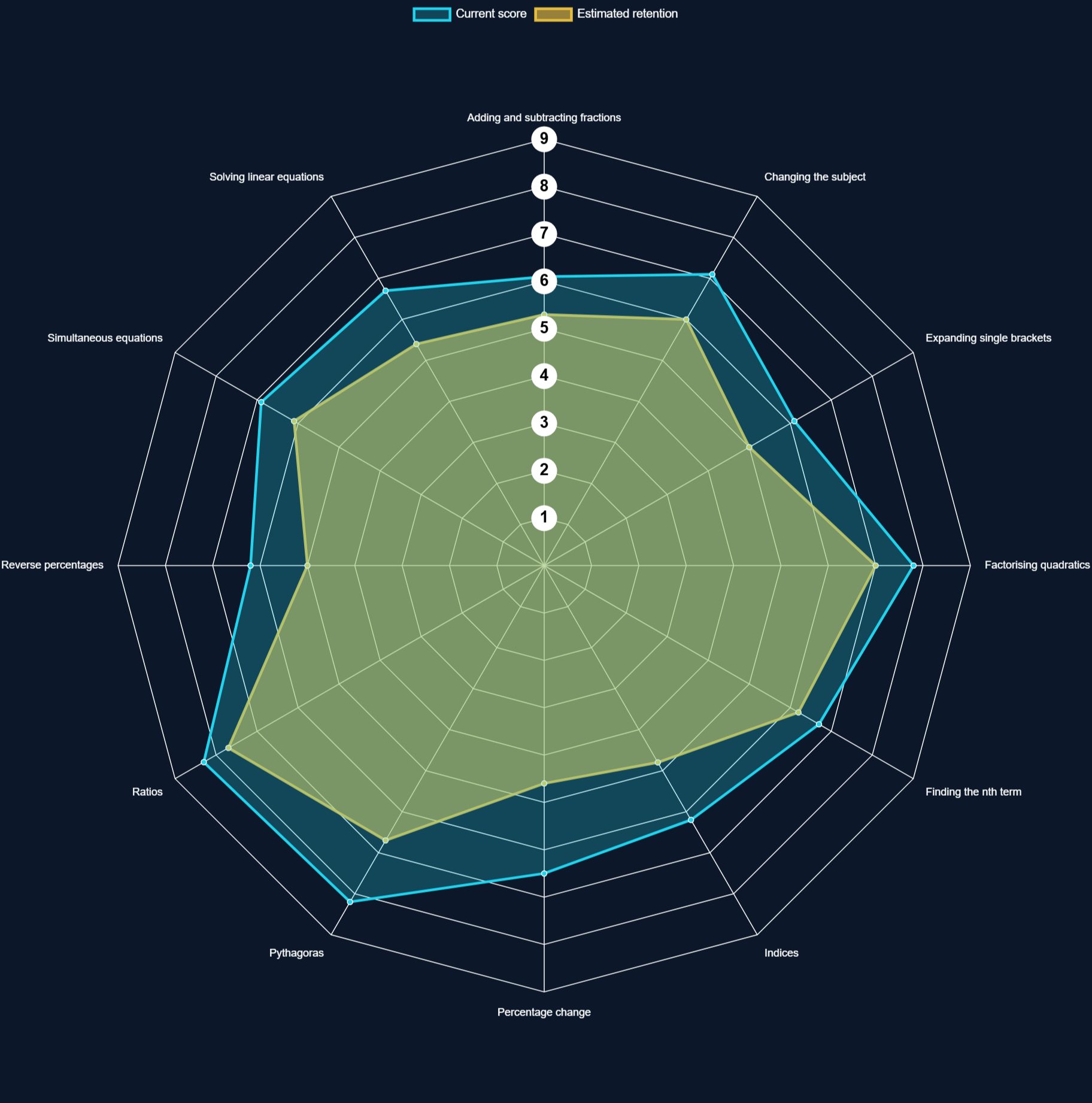
Every student's grade in every topic they have practised, worked out from their last ten answers, with a class mean underneath, so you can see which topics to teach again.
Does it work?
Across 411 topics practised by 81 students, accuracy rose from 69% on their first ten questions to 84% on their last ten.
Measured on real students using Bow Tie Maths, counting every topic a student answered at least 20 questions on, in October 2026.
"Rob has been incredibly helpful and patient with me, guiding me through much of the stuff he uses, especially on the technology side of things. I have used his app with my own tutees and continue to use it, enjoying very good and welcome success."— Archie Mohlabane, tutor
See it in action
Simple, transparent pricing
£5.99/month for the teacher tools, plus a seat for each student:
- 1–5 students — £3.49 each
- 6–15 students — £2.99 each
- 16+ students — £2.59 each
About £16.46/month
Buying for a whole department or school? School licences have custom pricing, and a pilot is a good place to start. Message Rob on WhatsApp
Common questions
How do seats work?
You get one licence with one reusable join code. Each student redeems the code on their own account and gets full app access, sponsored by you.
Can I add more students later?
Yes — change your seat count yourself from My licence in your dashboard. You'll see exactly what it costs before you confirm, and your price updates to match the tier.
Do all my students share one code?
Yes, one code covers your whole licence up to the number of seats you've bought.
Can I cancel anytime?
Yes. Manage or cancel your subscription anytime from the billing portal in your dashboard.